SHIP BUSTERS

Developed by Invo Tech Inc., the company behind INVO

Gold & Transfers

Real premium currency. Buy it, spend it, send it, take it with you.

Gold in Ship Busters is INVO currency. It is your own gold balance on your INVO ID, not locked inside one game. Spend it at the harbor market, send it to another captain by phone number, or carry it across to another supported INVO game, where it arrives as that game's own currency. Every move is approved with a passkey.

How transfers work Wishlist on Steam

  • Bought or received, never farmed
  • Send to any captain
  • Move to other supported INVO games
  • Approved with passkeys
  • Free to play on every platform

The technology

One currency, many games

Ship Busters is developed by Invo Tech Inc., the company behind INVO, and runs on INVO, a network that lets players carry premium currency between games and platforms. In Ship Busters, that currency is gold.

  • It is real INVO currency. Gold is kept as a gold balance on your INVO ID, tied to the email on your Ship Busters account. The balance you see in the game is INVO's balance, not a number stored on your device.
  • It can leave the game. Send it to another captain, or move it to another supported INVO game, where it arrives as that game's currency.
  • The server grants it, never the device. Purchased gold is credited when the payment is confirmed on the server side, so a payment still pays out even if you close the game the moment it clears.

That is why the Steam store page lists Requires 3rd-Party Account: INVO. Your INVO ID is simply your Ship Busters sign-in with an email on it. Learn more about INVO.

How gold moves on the INVO network Your gold balance sits on your INVO ID. From there gold can go to another Ship Busters captain as gold, or to another supported INVO game where it arrives as that game's currency. Purchases on Steam or in the browser feed the same gold balance. Your gold balance on your INVO ID Steam Wallet buy gold on Steam Card checkout in the browser game Another captain stays as gold Another supported INVO game arrives as its currency IN OUT
Gold comes in by purchase or by transfer, and goes out by spending or by transfer.

Getting gold

Bought or received. Never farmed.

Gold is the one currency the game never hands out. No battle, reward track, Voyage or drop ever pays it. You get gold two ways: buy it, or have another player send it to you. Silver and energy are what you earn by sailing.

On Steam

Launches Oct 29, 2026

Pick a pack on the Shop's gold shelf and pay from your Steam Wallet. The price list comes from Steam.

  • Windows: Steam shows its own approval over the game.
  • macOS: Steam's checkout opens in a window of its own.
  • Gold lands in your gold balance the moment Steam confirms.

In the browser

Launches Oct 29, 2026

INVO's secure checkout opens inside the game, so you never leave the sea to buy. Ship Busters never sees or stores your card number. Play free from Oct 29.

  • Pay by card on INVO's hosted page.
  • Gold is credited once the payment clears.

iPhone and Android

Launches Oct 29, 2026

The phone versions run the same game and the same INVO ID, so your gold balance is the same gold wherever you sign in.

The gold shelf in the browser game

10 gold to the US dollar at every tier

  1. 10GOLD
    A Handful
    $1.00
  2. 50GOLD
    A Purse
    $5.00
  3. 100GOLD
    A Chest
    $10.00
  4. 150GOLD
    A Pirate's Hoard
    $15.00
  5. 300GOLD
    A Galleon's Hold
    $30.00
  6. 1,000GOLD
    An Armada's Ransom
    $100.00

Gold is never discounted: every tier is the same rate, so a bigger pack is a convenience, not a better deal. On Steam, packs and prices are set by Steam and paid in your Steam Wallet currency.

You need an account with an email to buy. INVO finds your gold balance by your email, and your receipts go there too. Try to buy without one and the game asks you to sign in first, then opens the checkout straight after, so the gold is never stranded on a single device.

Spending gold

What gold buys at the harbor market

Every shelf in the Shop prices in gold, with the price set on the server. These are the prices in the game today.

Energy

More battles before you wait. Energy is bought with gold only.

  • Ration Flask, 50 energy1 gold
  • Full Barrel, 200 energy5 gold
  • Ship's Stores, 500 energy12 gold

Silver

The coin that levels your gear. Also earned by fighting.

  • Coin Pouch, 100,0001 gold
  • Strongbox, 300,0003 gold
  • Vault Haul, 1,000,00010 gold
  • King's Ransom, 3,000,00025 gold

Parts

A single 3-star piece for the slot you choose: hull, mast, sail, gun, ram or keel. A flat price, with no crates and no odds.

  • One 3-star part1 gold

Ships of the Line

Every ship arrives whole and ready to sail, fitted with a full six-piece 7-star rig. Ten ships are on the shelf, from the Rust Bucket at 60 gold to the Capital Ship at 200 gold.

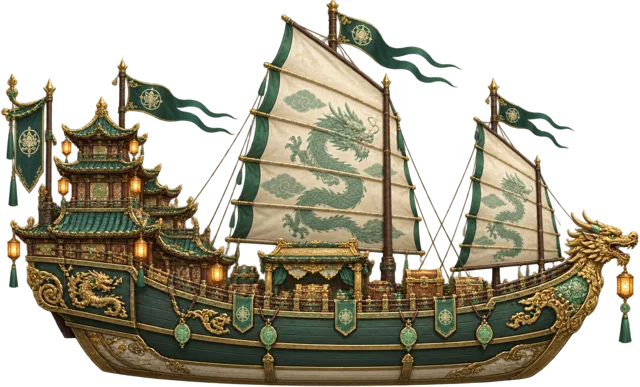
The Temple Ship, a jade and gilt junk with dragon-painted sails
Temple Ship Pack90 gold
The Sea Dragon, a blue and silver longship with a dragon prow
Sea Dragon Bundle160 gold
The Man-o'-War, a towering blue and gold warship with celestial sails
Man-o'-War Bundle180 gold
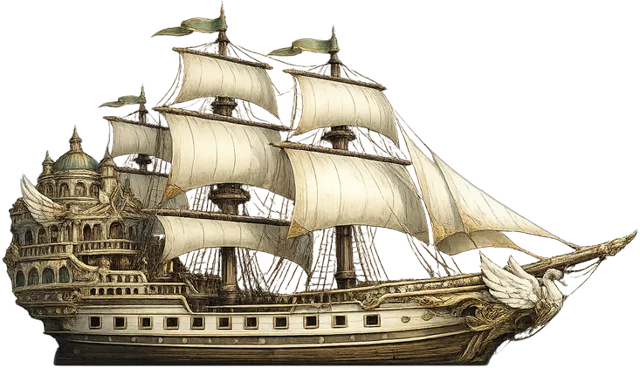
The Capital Ship, a white-sailed galleon with an ornate stern castle
Capital Ship Bundle200 gold
  • Rust Bucket Pack60 gold
  • Heaven Fleet Bundle100 gold
  • Red Dawn Bundle130 gold
  • Moth of the Sea Bundle and Dark Pearl Bundle150 gold each
  • Jelly Belly Bundle170 gold

Rig packs

Gear sets for the fleet you already have, on the Shop's This Week shelf.

  • Celestial Brig Pack20 gold
  • Red Dawn Rig50 gold
  • Dark Pearl Rig70 gold
  • Capital Ship Rig100 gold

The Captain's Charter

99 gold buys 30 days of standing, on every build. Buy again while it is live to extend it, up to 90 days ahead. A monthly charter that renews automatically is also offered. While you hold it:

  • Silver granted each charter month3,000,000
  • Bigger energy tank, faster refill+35% refill
  • Every fitted part fights as if levelled higher, against the sea+1 to +3
  • Extra daily reward claim+1 a day
  • Extra part storage+100 slots
  • No adson

Charter perks never apply in duels. When a charter ends the perks stop, and nothing you own is taken away.

Free to play. The whole game is free. In-game purchases are optional, and nothing sold in the shop is needed to finish the campaign or win a duel.

From the Ship Busters Steam store page

Transfers

Your gold can leave the game

This is what makes INVO gold different. Open TRANSFERS on the top bar (or Gold transfers in Captain's papers), pick where the gold is going, and send it. Gold is addressed to a phone number, so the person on the other end does not even need to play Ship Busters yet.

Ship BustersAnother captain

Send gold to a player

  • Pick Ship Busters, which is pinned first on the destination grid.
  • Enter the number of the captain receiving it, and the amount.
  • It stays as gold, in this game.
  • Your own number is refused here, because the gold would not go anywhere.

Ship BustersAnother supported INVO game

Move gold to another supported INVO game

  • The destination grid shows each supported INVO game with its icon and the currency your gold will arrive as.
  • The gold crosses over and lands as that game's own currency.
  • Your own number is fine here. That is how you move your own gold to your own account in the next game.
  • INVO takes a fee on the way, and the form shows that game's minimum and maximum before you send.

How a transfer works, step by step

  1. Sender

    Choose where

    Pick Ship Busters or another supported INVO game. Games not yet open for transfers are greyed out and cannot be picked.

  2. Sender

    Number and amount

    Choose the country, type the number the way you say it, and enter how much gold. Limits are checked right there.

  3. INVO

    Gold is held

    The amount is reserved for ten minutes. Nothing has moved yet; it just leaves your available balance while you confirm.

  4. Sender

    Approve with a passkey

    Fingerprint, face or device PIN. This is the step that actually spends it. On Steam you approve on your phone.

  5. INVO

    Safe in escrow

    The gold waits with INVO until the other side collects it. Sent is not collected, and the Activity tab says which.

  6. Recipient

    Collected

    The recipient opens Collect and takes it with their own passkey. No codes are passed around.

Not approved in ten minutes?

The reservation lapses on its own. Nothing is spent and the gold comes back. Activity shows it as "never confirmed, so nothing was spent".

Playing on Steam?

The game shows a QR code and a short code. Approve on your phone and the transfer finishes on your PC or Mac. See how.

Held for a check?

Some moves pause for a review or an approval. That is not a failure: the gold is held safe and the move shows under Activity until it settles.

SEND

Where it is going, to whom, and how much. Shows your balance and anything currently held against a transfer you have not confirmed.

COLLECT

Gold sent to you, each with a one-tap passkey Collect. On a device with no passkey yet, it offers Enrol this device first.

ACTIVITY

Moves still waiting on your approval, moves on their way, and finished ones. A count on the TRANSFERS button tells you when something needs you.

Steam and desktop

Send from your PC. Approve from your pocket.

Purchases and transfers both work in the full Steam game. A passkey is tied to a website, and the desktop game window has none to tie it to, so the passkey step moves to your phone, where your passkey already lives.

  1. Start the send as normal. The game shows Approve it on yer phone with a QR code and a short code.
  2. Scan the QR with your phone, or open the address shown and type the code.
  3. Approve with your fingerprint or face.
  4. Keep the game open. It waits and finishes the transfer by itself, with a countdown showing how long the code is good for.

On Steam there is also an Open it in me browser button, if your computer's browser already has your passkey. The first time a new phone is used, the game asks you, on the game screen, to confirm the phone is yours by matching a short code. Answer no and nothing leaves your purse. Collecting gold on Steam works the same way.

Safety

Built so a borrowed phone cannot empty your purse

Gold is real money, so every move out, and every collection in, needs proof that only you can give.

Passkeys, both ways

Sending and collecting are both approved with a passkey: a credential that stays on your device, unlocked with your fingerprint, face or device PIN. It cannot be phished, read off a lock screen or captured with a SIM swap. There are no texted codes for moving gold.

Two steps, always

Naming an amount only reserves it. Nothing moves until you approve, and that step is never skipped or remembered. A stolen session can start a move; only the device with your passkey can finish one.

One code, once per device

Setting up the first passkey on a device needs a one-time code, sent to both the phone and the email on your account. That code creates a passkey; it never moves gold.

"Is that your phone?"

When a desktop approval is picked up by a phone for the first time, the game asks you on the game screen to confirm it by matching a code. A stranger who photographs the QR cannot press yes on your screen. The approval code itself never leaves our server.

24-hour cooldown after recovery

Lost your passkey? Recover it from the passkey screen. A newly replaced passkey can collect straight away but cannot send gold for 24 hours, and the game says so before you start, not when you try to pay a friend.

Your gold, your email

INVO finds your gold balance by the email your sign-in proves, not by anything typed into a form. Your phone number is only an address for gold, never a password, and one number belongs to one captain.

Holds are not failures

Sometimes INVO pauses a move. In every case the gold is held safe and the move stays under Activity until it settles.

A closer look
INVO is reviewing the move. It clears by itself.
Guardian approval
A minor's transfer waits for a guardian to approve it before it goes.
A stronger confirmation
INVO asks for extra proof before the move goes through.
Confirming the recipient
INVO checks who is on the other end while the gold waits.
A shared phone number
If the receiving number needs its owner's permission, they are asked, the gold is held, and the same Collect button works once they say yes.
Both games must be live
Gold only moves between games that are open for transfers on INVO, and the game tells you before you enter anything.

Before you start

What you need, and where to get help

  • The full game. Gold, purchases and transfers are part of the full Ship Busters, not the Next Fest demo.
  • A registered account with an email. Gold travels with an account, not a device. Your email is the key to your INVO ID, which is why Steam lists INVO as a required third-party account.
  • Your phone number on file for transfers, under Captain's papers, Contact details. It is asked once and kept.
  • A passkey on your device, or on Steam and other desktop builds, your phone to approve with.
  • An internet connection. Buying, sending and collecting all happen online.

Purchase history

Open Captain's papers and choose Purchase history. It lists gold bought, gold spent and anything refunded, with the date, the price in US dollars where there is one, and the gold amount. Transfers have their own record under the Activity tab.

Something not right?

A purchase can take a moment to land after checkout closes. If it is still missing, or a transfer looks stuck, email support@ourinvo.com with your Captain ID, the email on your account, your platform, roughly when it happened and the amount.

Where it works

Gold on every platform

One gold balance follows your INVO ID everywhere you sign in.

PlatformAvailabilityBuying goldSending and collecting
Steam (Windows, macOS)Launches Oct 29, 2026Yes. Paid from your Steam WalletYes. Approved on your phone or in your browser
Web browserLaunches Oct 29, 2026Yes. INVO card checkout inside the gameYes. Approved with a passkey
iOS (App Store) and Android (Google Play)Launches Oct 29, 2026Same INVO ID and gold balanceSame INVO ID and gold balance
Next Fest demo (Oct 19-26, 2026)Free on Steam during Next FestNo. The demo has no shopNo. No transfers or account screens

Questions

Gold and transfers FAQ

What is gold in Ship Busters?

Gold is the premium currency of Ship Busters. It runs on INVO, the premium currency network from Invo Tech Inc., the developer of Ship Busters, and is kept as a gold balance on your INVO ID, tied to the email on your Ship Busters account. Because it lives on INVO, gold can be bought, spent in the shop, sent to another player, or moved to another supported INVO game.

Can I earn gold by playing?

No. Gold is the only currency in Ship Busters that is never awarded by play. No battle, reward track, Voyage or drop pays gold. You get gold by buying it or by receiving a transfer from another player. Silver and energy are earned by playing.

How do I buy gold on Steam?

In the full game on Steam, open the Shop and pick a gold pack. You pay with your Steam Wallet: on Windows Steam shows its own confirmation over the game, and on a Mac Steam's checkout opens in a window of its own. Gold is added to your gold balance once Steam confirms the payment. Prices on Steam come from Steam.

Can I send gold to a friend?

Yes. Choose TRANSFERS on the top bar, pick Ship Busters as the destination, enter your friend's phone number and the amount, then approve with your passkey. Your friend collects it with their own passkey. The person you send to does not need to play Ship Busters yet.

Can I move gold to another supported INVO game?

Yes. The Send tab lists the supported INVO games that gold can go to, each with the currency it arrives as. Pick a game and the gold crosses over as that game's own currency. Your own phone number is fine here, which is how you move your own gold to your own account in another supported INVO game. Moves to another supported INVO game carry an INVO fee, and the form shows each game's limits before you commit.

What happens if I start a transfer and do not approve it?

Starting a transfer only reserves the gold. Nothing moves until you approve it. A reservation lasts ten minutes; if it is not approved in that time it lapses, nothing is spent, and the gold comes back to you on its own. The Activity tab shows it as never confirmed.

How do I approve a transfer in the Steam version?

The desktop game window cannot hold a passkey, so you approve on your phone instead. The game shows a QR code and a short code. Scan the QR with your phone, or open the address shown and type the code, then approve with your fingerprint or face. The game waits and finishes the transfer by itself. On Steam you can also open the approval in your computer's browser.

I lost or replaced the device with my passkey. What now?

Use Lost or replaced yer passkey? on the passkey screen to recover and make a new passkey. For your safety, a newly replaced passkey can collect gold straight away but cannot send gold for 24 hours. If you still have the old device, use that instead.

Does the Steam Next Fest demo include gold?

No. The free Next Fest demo has no shop, no purchases, no transfers and no account screens. Gold is part of the full game.

Do I have to buy gold to enjoy Ship Busters?

No. Ship Busters is free to play. In-game purchases are optional, and nothing sold in the shop is needed to finish the campaign or win a duel.

Where can I see what I have bought?

Open Captain's papers and choose Purchase history. It lists gold bought, gold spent and anything refunded on your account. For help with a purchase or a transfer, email support@ourinvo.com.

Set sail with your gold

Ship Busters launches Oct 29, 2026 on Steam, iOS, Android and the web, free to play. Wishlist now, and come talk shop with other captains on Discord.

Wishlist on Steam Discord Transfer help